Hello!
Is there a way to get a repeat/task from Datablaze to show up in a textbox? I know I can do this for pretty much anything else, but I can't figure out how to get this specific string to show up in a textbox.
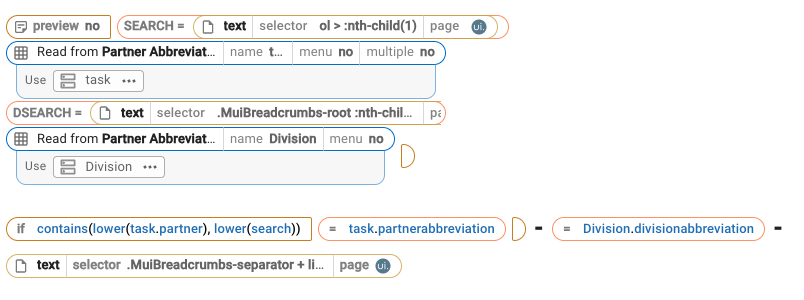
I have data pulling over from a Data Blaze Table and I need this string to pull into a text box. I would post the whole command, but it is tied to a table, so I think a screenshot would help.
This command works perfectly, but now I just need the final product to spit out in a text box. Basically, the Task.partnerabbreviation returns as ABC, then Division.divisonabbreviation returns as EFG and then the website data returns as EXAMPLE
So my final product shows up as ABC - EFG - EXAMPLE, which is perfect, but then I have this info push to another place after the snippet is submitted, so I need it to show up in a textbox.
I have tried doing a text field and having the titles pull in as default text, but this has not worked. I tried a few other things and keep getting errors. I know the below does not work at all, but just another example of what I am trying to get at:
Is this even possible? I have a workaround planned, but figured someone may know!
Not been able to test this as you've only posted screenshots but would this work:
{result="Part"&"-"&"Div"&"-"&"Adv"}
{=result}
Hello @tonydow ! It took me a minute, but I made a real example! it looks like the solution you provided did not work. Hopefully this helps give a better idea of what I am looking to execute!
{dbselect: SELECT Partner, PartnerAbbreviation, Division, DivisionAbbreviation FROM Abbreviation; space=id; multiple=no; menu=yes; name=task}
{dbselect: SELECT Division, DivisionAbbreviation FROM Abbreviation; space=id; menu=yes; name=Division}
{Part=task.partnerabbreviation}{Div=Division.divisionabbreviation}
{=part}-{=div}
{formtext: default=result; name=result}
{result="part"&"-"&"div"}
{=result}
Try
{result=part&"-"&div}
Hi Allison,
Thank you for providing an example! I was able to modify it and construct a potential solution.
In the second-to-last line, where you define result as "part"&"-"&"div", you could instead use the concat function and write concat(part, "-", div). This should allow variables like part to be combined with other text and variables.
I hope this helps! Let me know if you have any other questions or would like an example posted.
Hello @Ashu_Gupta!
I just tried the following:
{result=concat(`part`,"-",`div`)}
{=result}
{formtext: default=result; name=result}
And it is not working still within the existing snippet! I tried a few variations and it looks like it is treating Part as a word regardless of how I do it. Any solutions are appreciated!
Hi Allison,
Here is a complete snippet example using the concat function. I hope this helps! It uses concat inside the snippet example you provided. As tonydow mentioned, you may alternatively write {result=part&"-"&div} instead of {result=concat(part, "-", div)} as well.
{dbselect: SELECT Partner, PartnerAbbreviation, Division, DivisionAbbreviation FROM Abbreviation; space=id; multiple=no; menu=yes; name=task}
{dbselect: SELECT Division, DivisionAbbreviation FROM Abbreviation; space=id; menu=yes; name=Division}
{Part=task.partnerabbreviation}{Div=Division.divisionabbreviation}
{=part}-{=div}
{formtext: default=result; name=result}
{result=concat(part, "-", div)}
{=result}
Thank you so so much, this worked perfectly on all counts. Appreciate you!
Hi @Allison_Fountain! I got your message about this but was on vacation. Glad you got your solution though! Thank you for reaching out. 
-Brad