Thanks for letting me know. Here is the updated snippet:
Command to enable best offer:
{if: catch({site: text; page=https://www.ebay.com/\\*; selector=[name="bestOfferEnabled"]:checked; frame=top},"ERR")="ERR"}{click: selector=[name="bestOfferEnabled"]; frame=top}{endif}
Command to enable scheduling selection:
{if: catch({site: text; page=https://www.ebay.com/\\*; selector=[name="scheduleListingSelection"]:checked; frame=top},"ERR")="ERR"}{click: selector=[name="scheduleListingSelection"]; frame=top}{endif}
Command to enable General Promote Listing:
{if: catch({site: text; page=https://www.ebay.com/\\*; selector=[name="Toggle General"]:checked; frame=top},"ERR")="ERR"}{click: selector=[name="Toggle General"]; frame=top}{endif}
As you can see in each part, I'm only changing the part inside "name=".
This is how it looks to me on eBay:
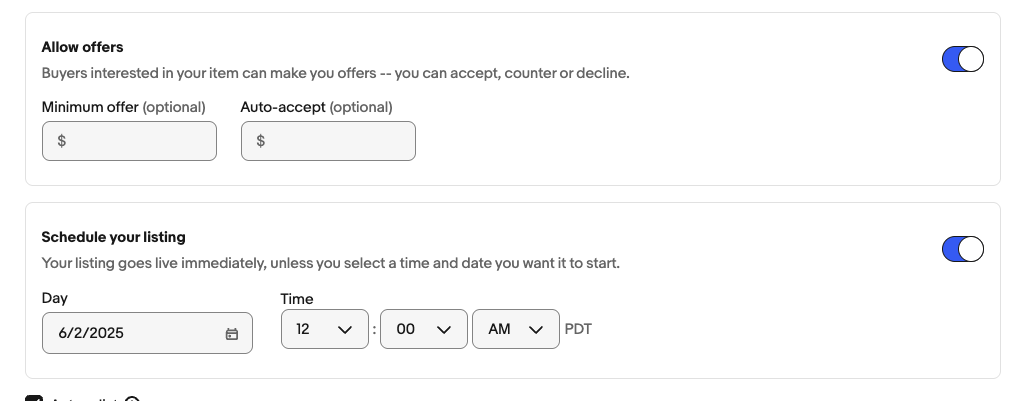
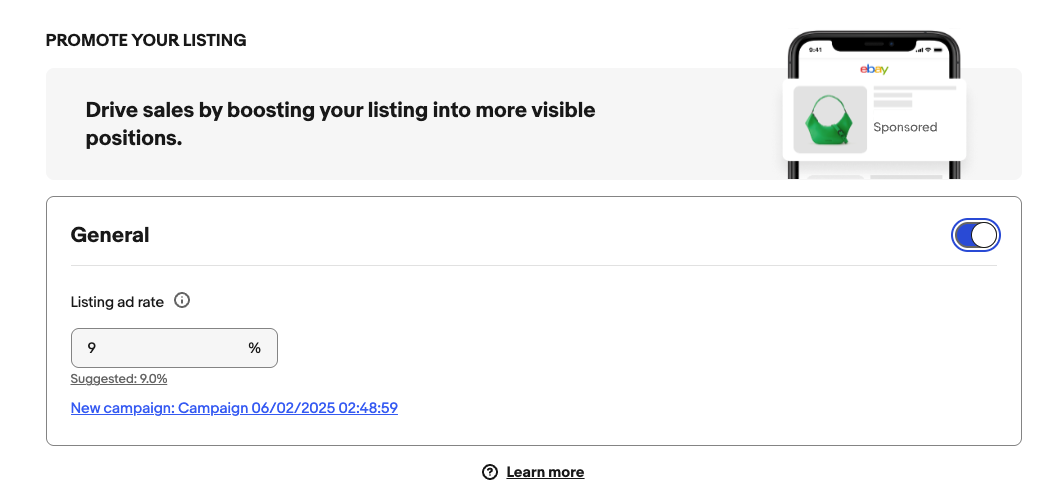
If it looks different for you, please do the following:
- Right-click inside the radio button
- Select the "Inspect" option - which is usually the last option in the menu.
- A panel will open on the right side.
- Now take a screenshot of the Chrome window
Please send me this screenshot, so I can find the name of the input element that we want to click on.