Hello! New TB user here and I have a question about using the dropdown menu command (or some other similar one).
If I had to write what I'm looking for as a user story, I'd say, "As a TB user I want to create a single shortcut that allows me to view a list of text strings and select one of the strings using a secondary hotkey so that I can efficiently insert text.".
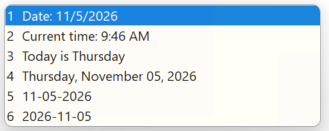
Take inserting a date/time as an example. I want to use one shortcut to choose from several different date/time formats. It's easy enough to set that up in a dropdown menu field. The issue is, when I use the shortcut and the TB window opens to show the form I can only see the options one at a time and have to use the down/up arrows (or mouse) to cycle through options. I'd rather see all the options at once and then just hit a secondary key (like 1 through 9) to select an item in the list.
Is that possible with the dropdown menu or other type of command?
Here's a screenshot of a similar tool in action. When the shortcut is used this form opens and shows all the available date options I've set up. I then just need to hit the 1 - 6 keys to select the matched text string and have it inserted (or I could use up/down arrows and then select enter). From a productivity perspective, using the secondary number selection makes it quicker and more efficient.