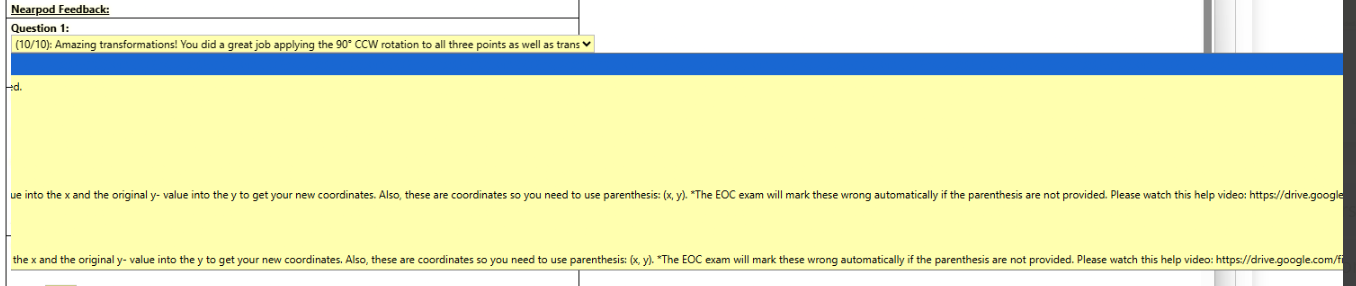
Hi! My snippets used to work fine. The dropdown snippets would always cut off on the right side on the drop down preview but that was fine for me because I could still figure out which one to select based on the first half of the sentence. Yesterday I cleared my cache, cookies, etc on my Chrome and I am not sure if that did anything but now all my drop down options are cut off on the LEFT side and I cannot read the snippets. It does this in both the desktop app and browser extension. I have troubleshooted every way I could find online- reloading extension, turning extension on and off, quitting browser, updating and restarting computer, zooming in and out, etc. NOTHING WORKS! Has anyone else had this problem/know of a solution? I am not sure how this happened! Thank you!
Hi Morgan,
Apologies for the inconvenience! I found that this is an issue in Chrome 156 on Windows itself. This is not coming from Text Blaze. This worked fine in Chrome 155. I have reported this to the Chrome team and will wait for their response.
At the moment, my suggested workaround for you is to reduce the length of your form menu options. For example, here's one way using if conditions:
{note}{formmenu: name=choice; 10/10; 8/10; 6/10}{endnote}{if: choice="10/10"}(10/10) Good job!{elseif: choice="8/10"}(8/10) Needs work{else}(6/10) Contact me!{endif}
You can create these if conditions automatically using our tools: October Development Update
Hi Morgan,
Chrome has released a fix now on their end. Please visit chrome://help/ to update your Chrome, and let us know if the issue persists.
Best,
Gaurang