When creating Error commands - especially the newer variations that aren’t actual errors - I want the ability to force multiple lines instead of relying only on text wrapping
Method 1: Both messages in 1 command capsule
- The only option is to communicate information in sentence or paragraph form.
- Requires Method 2 to communicate listed information or points, which users handling large amounts of information can more easily digest.
{error: This is the first thing I want to tell the user. This is the second thing I want to tell the user.; type=info}
Method 2: Both messages in separate command capsules
- Results in an unnecessary additional “!” icon.
- " ! " icon and visual gap between capsules is unsightly and gives user impression of topic change.
{error: This is the first thing I want to tell the user.; type=info}
{error: This is the second thing I want to tell the user.; type=info}
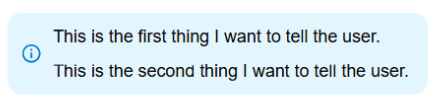
Here is a crude mockup of my idea:
- Keeps all topic-related content within 1 command capsule.

- One “!” icon denotes to the user that this is all related information.
- Ability to force multi-line entry allows content to be chunked for efficient user interaction.
As for attempted solutions, I've tried pressing the [Enter] in the editor. Also, using the Advanced Editor mode, I've tried pressing the [Enter] key a couple times as well as inserting "\n\n\n". None of these work. However, in both editing modes, pressing the [Enter] key does show the line breaks.
Thank you for considering this idea.
-Brad 