I recently discovered AI Blaze looks like a interesting tool,just takes a bit long to respond.
Is there a beginner guide to AI Blaze ?
Similar to textblaze docs
Ignore Solved -
I recently discovered AI Blaze looks like a interesting tool,just takes a bit long to respond.
Is there a beginner guide to AI Blaze ?
Similar to textblaze docs
Ignore Solved -
Hi @Bhima_Charan_Tudu ,
Glad you found AI Blaze and find it interesting.
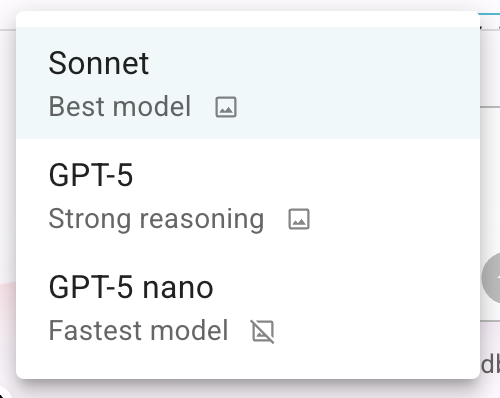
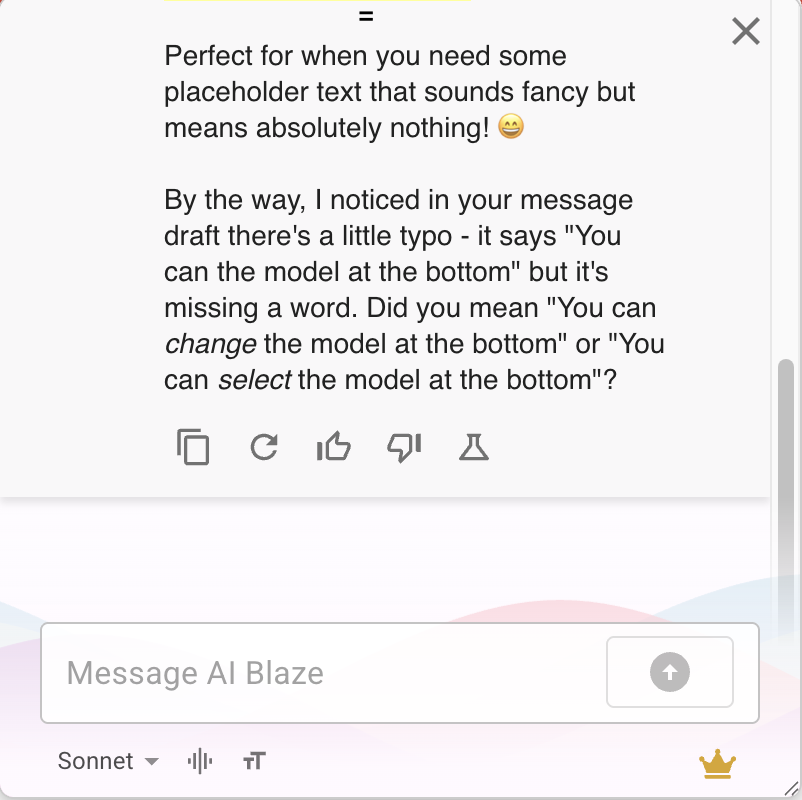
You can try different models to see what is working best for you. You can switch the model at the bottom. Should look something like this
We don't have a guide yet. Thanks for recommending. We will think about it adding in future.
But most of the principles or syntax work the same as Text Blaze.
Hey Vinod, I'm having trouble finding where to select the model. Can you point me in the right direction?
@Bhima_Charan_Tudu ,
You can use the screenshots I attached in my previous message as a reference.
In the AI sidebar, you should see a dropdown at the bottom left corner where you can switch the model.
Even on the chat window, you can see the model switch at the bottom left corner.
Hey @Bhima_Charan_Tudu
I found docs for AI Blaze. Sorry for the wrong information earlier.
Here is the link AI Blaze | Getting Started