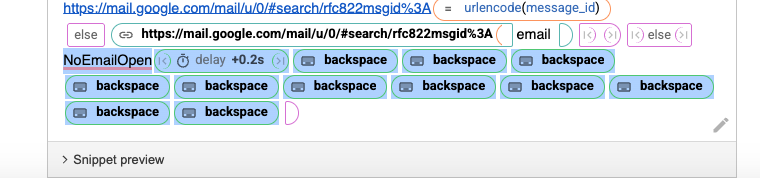
Hi @Gaurang_Tandon, I'm having trouble using the snippet you shared - it doesn't look like it's formatted as a snippet and doesn't work if i paste it in to my snippet.
I've tried implementing the {link} command, but I'm not sure how to actually add it to my snippet, as I can't see an option in the UI to add a 'link'.
Ok, got it working by copying and pasting the example snippet in the {link} command page. Is there a more elegant way to delete my 'NoEmailOpen' message? I tried Ctrl+Backspace to no avail.
Glad to know you got it working  If you don't want the message to show, you can delete the contents of the {else} part completely.
You can delete the part I highlighted in the screenshot above.
Thanks @Gaurang_Tandon. I want to keep the temporary message to notify users the snippet has fired, just wondering if there was a cleaner way to remove it after the time delay?
Also, for future reference, how do i insert the link command via the Textblaze UI? Feels like I'm missing something obvious, but I can't find it anywhere.
If you only need to show a notification, you can use this snippet instead: {run: notify("NoEmailOpen")}. This will pop up a message without inserting any text into the textbox.
You're right, it's not available in the UI at the moment. Sorry about any confusion about that!