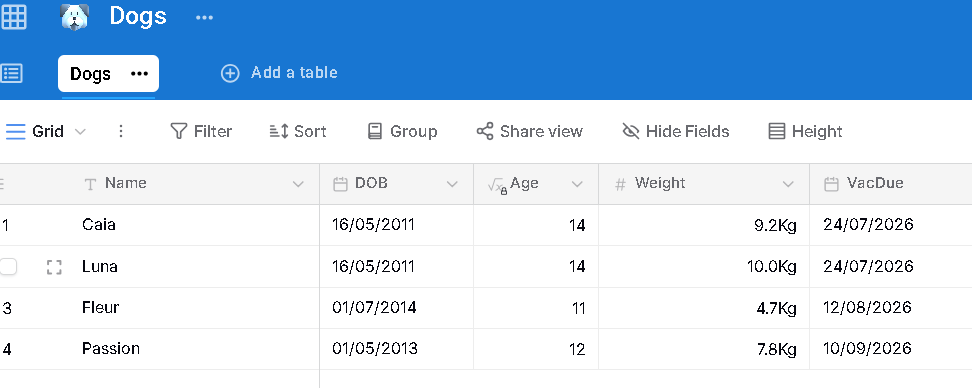
I have a table with date fields in DD MM YY format but when added to a snippet they change to YY MM DD. Is there a way to change this so they stay the same?
Hi Tony
Do I understand correctly that you have something like:
{formdate: YY MM DD; name=d}
{=d}
If so, you could use:
{formdate: DD MM YY; name=d}
{=d}
In the Data Blaze table there are two date entries that are just typed in dd/mm/yy format and when added to the snippet they change to yy/mm/dd
You can use the datetimeparse() and datetimeformat() functions to change the formatting of dates:
For example, to go from "dd/mm/yy" to "yy/mm/dd" you could use:
{formtext: default=25/12/20; name=d}
{=datetimeformat(datetimeparse(d, "YY/MM/DD"), "DD/MM/YY")}
Or if you wanted something more verbose:
{=datetimeformat(datetimeparse(d, "YY/MM/DD"), "LL")}
I added this to the snippet but it hasn't changed the dates in the table
{formtext: default=25/12/20; name=d}
{=datetimeformat(datetimeparse(d, "YY/MM/DD"), "DD/MM/YY")}
Can I share the snippet with you
You would need to adapt the example for your snippet. The example above uses the form variable name "d" to store the date I want to reformat. You would need to replace that with the date you are loading from Data Blaze. Happy to look at your snippet if you share it.
I have shared the snippet. Look forward to any advice. Happy New Year to you and all the team
Hi, how have you shared the snippet? I don't see it.
Could you copy the relevant portion of the snippet into this thread (redacting anything that may be sensitive)?
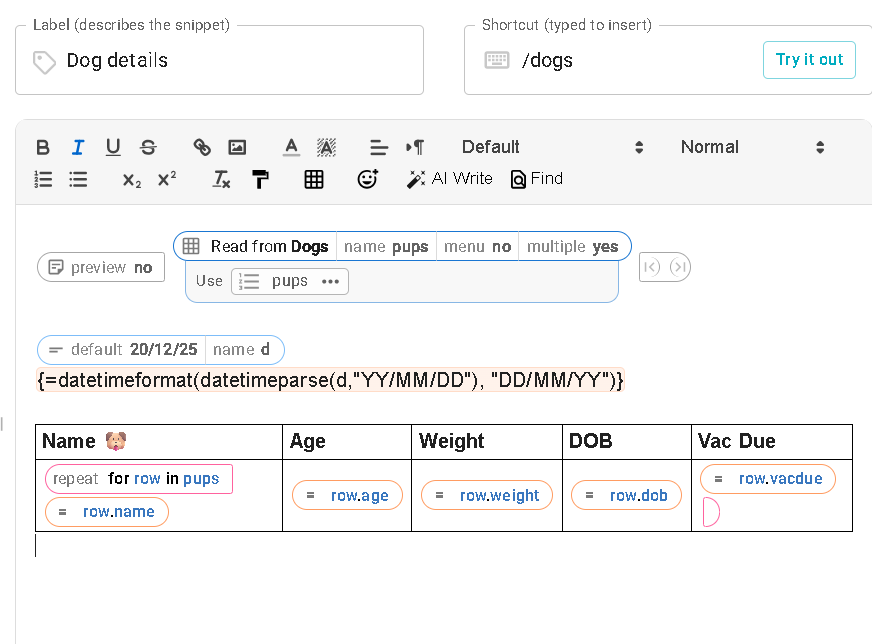
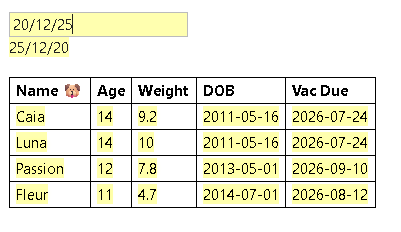
Thanks, Tony. You would need to adapt the formulas in the two date columns you have (DOB and Vac Due) to use the datetimeformat and datetimeparse logic like I did in my example.
You would replace the d variable I had in my example, with row.dob or row.vacdue or whatever the date variable is you want to reformat.
Thanks Scott, however I'm not too sure how I would go about this. Where exactly do I make the changes. Sorry to go on.
I have tried replacing d with row.dob but that doesn't change. Do they need to be in a particular format
Hi Tony,
Can you share the formula you are using? For the row.dob column; it should probably be something like:
datetimeformat(datetimeparse(row.dob, "YYYY-MM-DD"), "DD/MM/YY")
Does that need to be in the dbselect formula or seperate as in the image above
Also does the name in the default formula need to be row.dob as well and do i need a seperate formula for VacDue
{note: preview=no}{dbselect: SELECT Name, Weight, VacDue, DOB, Age FROM Dogs; space=5vwhNpRFkSJQZTjwT9tdJJ; multiple=yes; menu=no; name=pups}
{datetimeformat(datetimeparse(row.dob, "YYYY-MM-DD"), "DD/MM/YY")}{endnote: trim=yes}
Name {{^^%F0%9F%90%B6^^}} Age Weight DOB Vac Due
{repeat: for row in pups} {=row.name} {=row.age} {=row.weight} {=row.dob} {=row.vacdue}{endrepeat}
I have now got it working, with help from @Mansur_Kutybayev using this:
{note: preview=no}{dbselect: SELECT Name, Weight, datetimeformat(VacDue, "DD/MM/YY") as VacDue, datetimeformat(DOB, "DD/MM/YY") as DOB, Age FROM Dogs; space=5vwhNpRFkSJQZTjwT9tdJJ; multiple=yes; menu=no; name=pups} {endnote: trim=yes}
Thank you for your help.
Great to hear!
1 Like