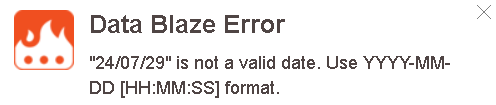
Can you please advise why this snippet is failing. Thanks
{dbselect: SELECT Name, datetimeformat(VacDue, "DD/MM/YY") as VacDue FROM Dogs; space=5vwhNpRFkSJQZTjwT9tdJJ; menu=yes} {=name} Current Vac Date: {=vacdue}
{newdate={time: DD/MM/YY; at={=vacdue}; shift=+1Y; pattern=DD/MM/YY}{=newdate}
Only run this when vaccination has been done.
{dbupdate: UPDATE Dogs SET vacdue = @newdate WHERE Name = @name; space=5vwhNpRFkSJQZTjwT9tdJJ; autoaddfields=yes}
{=name} Current Vac Date: {=vacdue}Hi @tonydow
In the snippet you shared I see {newdate= was not ended with }
Once you fix it please share a screen of the error you are seeing so I can help you better.
Is your VacDue a date field?
Here is something I got it working.
{dbselect: SELECT Name, datetimeformat(VacDue, "DD/MM/YY") as VacDue FROM Dogs; space=id; menu=yes}{=name} Current Vac Date: {=vacdue}
New Vac Date: {newdate={time: DD/MM/YY; at={=vacdue}; shift=+1Y; pattern=DD/MM/YY}}{=newdate}
Only run this when vaccination has been done.
{dbupdate: UPDATE Dogs SET vacdue = @newdate WHERE Name = @name; space=id; autoaddfields=yes}
I get “24/07/28” is not a valid date. In Data Blaze Vacdue is a European date format
I tried the same date in the example below and it seems to work.
Is your date 24 July 2028 or 28 July 2024?
{dbselect: SELECT Name, datetimeformat(VacDue, "DD/MM/YY") as VacDue FROM Dogs; space=id; menu=yes}{=name} Current Vac Date: {=vacdue}
New Vac Date: {newdate={time: DD/MM/YY; at={=vacdue}; shift=+1Y; pattern=DD/MM/YY}}{=newdate}
Only run this when vaccination has been done.
{dbupdate: UPDATE Dogs SET vacdue = @newdate WHERE Name = @name; space=id; autoaddfields=yes}
In Data Blaze it shows as 24/07/2027
Can you please try copying the above space + snippet and see if you observe the same issue?
If not, you may be able to identify the problem with your data and snippet.
Still get same error - date not valid
Can you please share the screenshot of the error for the new snippet?
Also, can you please share the following information
- Timezone configured on your device
- Browser name (Chrome / Firefox / etc)
Time Zone is UK. Browser is Edge
Thanks for sharing the screenshot. It helped me find the actual issue.
When we update/insert a date, it should be in ISO format.
I changed the snippet to change it. Please let me know if this helps.
{dbselect: SELECT Name, datetimeformat(VacDue, "DD/MM/YY") as VacDue FROM Dogs; space=id; menu=yes}{=name} Current Vac Date: {=vacdue}
New Vac Date: {newdate={time: YYYY-MM-DD; at={=vacdue}; shift=+1Y; pattern=DD/MM/YY}}{=datetimeformat(newdate, "DD/MM/YY")}
Only run this when vaccination has been done.
{dbupdate: UPDATE Dogs SET vacdue = @newdate WHERE Name = @name; space=id; autoaddfields=yes}
Thank you Vinod. That is now working. You're a star!
Tony
Sorry to be a pain. I have added an actual date but this has caused more parsing errors:
Only run this when vaccination has been done.
{dbselect: SELECT Name, datetimeformat(VacDue, "DD/MM/YY") as VacDue FROM Dogs; space=5vwhNpRFkSJQZTjwT9tdJJ; menu=yes}
Current Vac Date: {=vacdue} Actual Vac Date:{formdate: DD-MM-YY; name=actual}{=actual}
{new={time: YYYY-MM-DD; at={=actual}; shift=+1Y; pattern=DD/MM/YY}}}
New Vaccination Date: {=datetimeformat(new,"DD/MM/YY")}
{dbupdate: UPDATE Dogs SET vacdue = @new WHERE Name = @name; space=5vwhNpRFkSJQZTjwT9tdJJ; autoaddfields=yes}
Hi @tonydow
It is fine. You can always reach out if you need assistance.
In this case, the actual is not in the correct format. I just used the same format for actual you prefer to read.
And then changed it to the format DBUpdate need while shifting with 1 year.
{dbselect: SELECT Name, datetimeformat(VacDue, "DD/MM/YY") as VacDue FROM Dogs; space=id; menu=yes}{=name} Current Vac Date: {=vacdue}
Current Vac Date: {=vacdue} Actual Vac Date:{formdate: DD/MM/YY; name=actual}{=actual}
{new={time: YYYY-MM-DD; at={=actual}; shift=+1Y; pattern=DD/MM/YY}}}
New Vaccination Date: {=datetimeformat(new,"DD/MM/YY")}
{dbupdate: UPDATE Dogs SET vacdue = @new WHERE Name = @name; space=id; autoaddfields=yes}
Thanks again Vinod. As simple as that! At 77 I'm glad to still be learning with the help of the great team there.