I have a field in a Data Blaze table formatted as a number but when used in a snippet I can't format it as currency as it shows an error about it has to be a number to use formatting.
Hi @tonydow ,
Can you please give me more information on your snippet?
Is your snippet similar to this?
{dbselect: SELECT Name, Salary FROM Table1; space=id; menu=yes}
{=name}'s salary is {=salary; format=$0,.2f}
This the snippet. In the table row.price is formatted as money but comes up as an error. The price in Data Blaze is a number with a £ prefix. If it is the prefix that is causing the issue I can remove it.
Ref Weight gm Length mtr/yd Description Ply Price Stock Code
{repeat: for row in range}{=row.ref} {=row["weight grm"]} {=row["length mtr/yd"]} {=row.description} {=row.ply} {=row.price; format=$,.2f} {=row.stock} {=row.code}{endrepeat}
{=count(range)}
{dbselect: SELECT Ref, `Weight Grm`, `Length Mtr/Yd`, Description, Ply, Price, Number, Stock, Code FROM Range ORDER BY Number ASC; space=1IHeI043ip48EwKEPxb3ie; multiple=yes; menu=no; name=range; trim=yes}
The row.price does display as currency but still get the message "The format setting can only be used for numbers"
I have found that in another snippet that reads from the same Data Blaze table but uses a menu, I get the same error until I select a menu item.
@tonydow Here is the exact similar snippet you shared. I do not see the issue. May be there is something missing you shared. Please compare this with your Space setup and snippet and let me know what is the difference.
| Ref | Weight gm | Length mtr/yd | Description | Ply | Price | Stock | Code |
|---|---|---|---|---|---|---|---|
| {repeat: for row in range}{=row.ref} | {=row["weight grm"]} | {=row["length mtr/yd"]} | {=row.description} | {=row.ply} | {=row.price; format=$0,.2f} | {=row.stock} | {=row.code}{endrepeat} |
Total: {=count(range)}
{dbselect: SELECT Ref, `Weight Grm`, `Length Mtr/Yd`, Description, Ply, Price, Number, Stock, Code FROM Range ORDER BY Number ASC; space=id; multiple=yes; menu=no; name=range; trim=yes}
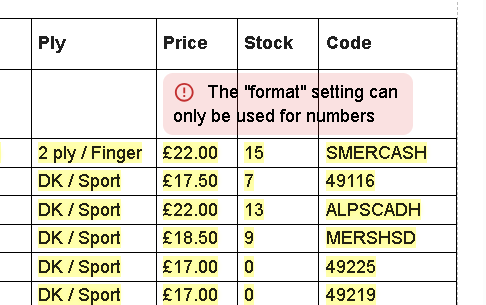
I can still use the snippet and delete the top row so it's not a big problem. The data displayed is correct.
What I can see, the first row has blank values. You need to handle formula, such that if the value is blank, ignore the value. Or set a default value in the column to default to zero.
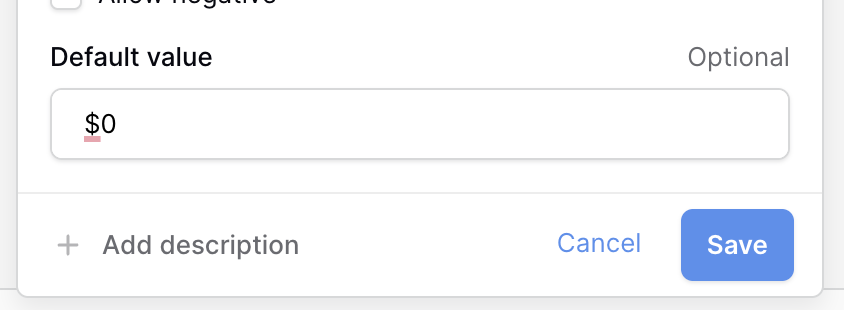
or
| Ref | Weight gm | Length mtr/yd | Description | Ply | Price | Stock | Code |
|---|---|---|---|---|---|---|---|
| {repeat: for row in range}{=row.ref} | {=row["weight grm"]} | {=row["length mtr/yd"]} | {=row.description} | {=row.ply} | {=row.price if row.price <> "" else 0; format=$0,.2f} | {=row.stock} | {=row.code}{endrepeat} |
Total: {=count(range)}
{dbselect: SELECT Ref, `Weight Grm`, `Length Mtr/Yd`, Description, Ply, Price, Number, Stock, Code FROM Range ORDER BY Number ASC; space=id; multiple=yes; menu=no; name=range; trim=yes}
Thank you. I did have a blank row at the bottom of the table which I hadn't noticed. My bad!
Glad I could help you figure it out.