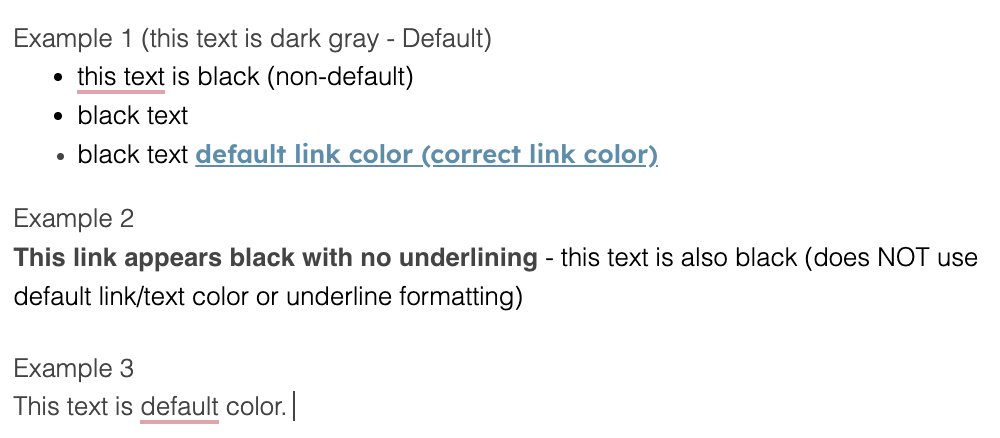
I've created several snippets both from copy and pasting previous emails or creating them from scratch in a word doc.
For whatever reason, some of my snippets do not use the default color formatting for my CRM/email client (hubspot and gmail in this case). Some snippets show up with the text colors that appear in text blaze, others paste properly with my default formatting. Confusingly, the snippets that appear with incorrect color formatting do not correlate with where they are created from - copy pasting previous email vs copy-pasting from google doc.
Is there a way to ensure the formatting is consistent with my typical settings? I am often combining several snippets into a single email and the different text color looks sloppy and is a pain to fix. My default text and link color are both custom colors that are not shown as a typical option in most text editors and email clients and so I'm hoping I can just remove all color formatting so they show up as though I were typing the email and creating links from scratch each time.
Welcome to the forum @Joshua_Brown!
We attempt to keep formatting as long as the text field where you trigger the snippet supports formatting.
Could you share your snippet or example formatted text that does not appear as expected in Gmail or HubSpot?
Sure - here is an example. I created 3 example snippets to show the inconsistent formatting that I'm experiencing.
Below the headers (Example 1, Example 2, and Example 3) I inserted the snippets into my email client. The default text color is dark gray, and the default link color is light blue.
It is working as expected for me.
- Could you share the example snippet content here?
- Do you use Text Blaze Windows desktop app?
- If it is a desktop app that you use, which email client produces an incorrect format?
Hi @Mansur_Kutybayev,
Thanks for the follow up. Not sure if I was clear in my most recent response, but ideally I'm wanting to have all text and links in snippets populate with the default color. So if it were working as intended for me all normal/non hyperlink text would have the color in Example 3 and all links would have the color and bolded style of Example 1.
- I apologize, I'm a little new to the community so not sure how to share a snippet. I'm only seeing an option to share a folder over email and then I see the + button in the forum text box that allows me to include an embedded snippet but not sure how to link the embedded snippet back to my personal snippets so you can see what I'm talking about.
- No. I'm on Mac and I only use textblaze in a chrome browser. If there's a desktop client for MacOS that may be easier to diagnose the problem, happy to download it.
- Not using a desktop app, but I use gmail and hubspot as my email clients. I think hubspot is integrated with my gmail so technically it should all be gmail.
Hi @Joshua_Brown
Can you try the following? In your dashboard, select the entire content of the snippet and use the remove formatting button. 
Then try using the snippet again.
Does that solve the problem?
If not, please email support@blaze.today and let's jump on a quick call.
Thanks,
Dan
Thanks Dan, that solved the text color issue, but unfortunately links are still not formatting consistently. I'm assuming this is user error given that I somehow missed the remove formatting button up until now. I'll get in touch with the support email.