Hello!
I am just dipping my toes in to utilizing Data Blaze, so I apologize if this already exists somewhere. I could not find it.
I have a process that I need to execute, where I pull in a Name, and then that Name has a group tied to it. I would like to select the Name in the dropdown via Text Blaze, and then I would have a second drop down that gives me the choices of only the Type in that group. Ultimately, what I am trying to accomplish is sort by Name, then by Type, then return only the abbreviations that are associated with those.
I am getting very hung up on the first part of filtering my "secondary" results to only Type based on whatever my first selection is.
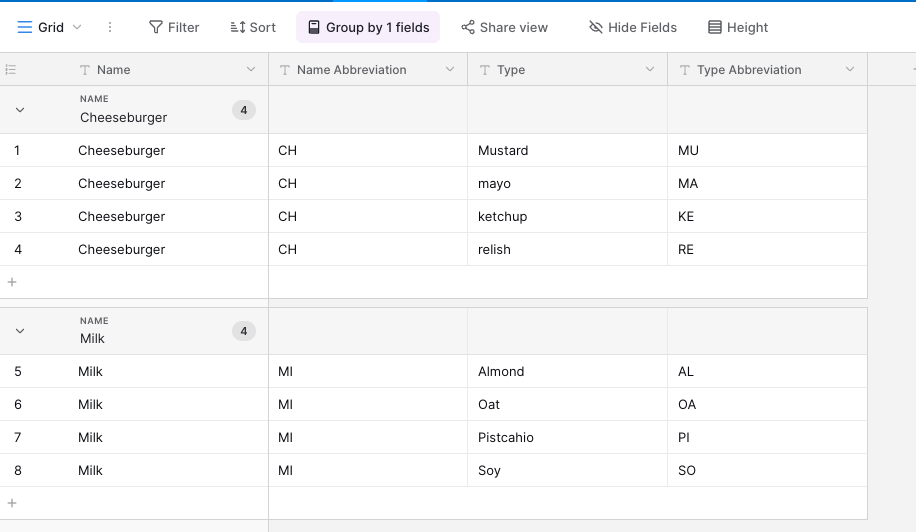
I have an example screenshot of my table to help understand this. When I select Cheeseburger, than only the Mustard, Mayo, Ketchup or Relish options are available for my second selection. Is this possible?
I wouldn't mind assistance on returning the abbreviations as well, but I can figure that out if you are only able to help with one of these.
Thank you in advance!
Hi @Allison_Fountain,
Yes, this is possible. You can use two "Read from table" commands, with the second one filtered by what you pick in the first:
{note}Name: {dbselect: SELECT Name FROM Table1 GROUP BY Name ORDER BY Name ASC; space=id; menu=yes}
Type: {dbselect: SELECT Type, `Type Abbreviation`, `Name Abbreviation` FROM Table1 WHERE Name = {=name} ORDER BY Type ASC; space=id; menu=yes}
{endnote}{=`name abbreviation`} {=`type abbreviation`}
GROUP BY Name lists each Name once in the first dropdown.WHERE Name = {=name} limits the second dropdown to the Types for the selected Name.- The dropdowns are inside a
{note}, so only the two abbreviations get inserted.
The ORDER BY ... ASC parts keep both dropdowns in alphabetical order. There is more on these queries in the BSQL reference.
Let me know if this works for you!
This is a version I've done without using Data Blaze but I can't get it to hide the dropdowns when inserted. Perhaps Ashwin could advise if that is feasable.
{formmenu: default=Cheeseburger; Milk; name=item; trim=yes}
{if: item="Cheeseburger"; trim=yes}{formmenu: Ketchup; default=Mayo; Mustard; Relish; name=side; trim=yes}
{if: side="Ketchup"; trim=yes} CH KE{elseif: side="Mayo"; trim=yes} CH MA{elseif: side="Mustard"; trim=yes} CH MU{else} CH RE {endif}{endif}
{if: item="Milk"; trim=yes}{formmenu: default=Almond; Oat; Pistachio; Soy; name=flavour; trim=yes}
{if: flavour="Almond"; trim=yes} MI AL{elseif: flavour="Oat"; trim=yes} MI OA{elseif: flavour="Pistachio"; trim=yes} MI PI{else}MI SO
{endif}{endif}
Hi @tonydow,
To prevent something from being inserted while still previewing it, you can use our {note} command. Here is the snippet that uses it.
{note}{formmenu: default=Cheeseburger; Milk; name=item; trim=yes}{endnote}
{if: item="Cheeseburger"; trim=yes}{note}{formmenu: Ketchup; default=Mayo; Mustard; Relish; name=side; trim=yes}{endnote}
{if: side="Ketchup"; trim=yes} CH KE{elseif: side="Mayo"; trim=yes} CH MA{elseif: side="Mustard"; trim=yes} CH MU{else} CH RE {endif}{endif}
{if: item="Milk"; trim=yes}{note}{formmenu: default=Almond; Oat; Pistachio; Soy; name=flavour; trim=yes}{endnote}
{if: flavour="Almond"; trim=yes} MI AL{elseif: flavour="Oat"; trim=yes} MI OA{elseif: flavour="Pistachio"; trim=yes} MI PI{else}MI SO
{endif}{endif}
Thanks Ashwin. I tried using the {note} {endnote} command but couldn't get it to be recognised. I think I put the {endnote} in the wrong place.
This worked perfectly! Thank you so much!