Hi, how do I give a name to the output from one formula so I can use it another calculation elsewhere in the snippet?
{formtoggle: name=Provide adjusted WBC due to nRBC; default=no}{formtext: name=nRBC per 100 WBC} nucleated red blood cells are counted per 100 WBC. {note}Automated WBC count from analyzer = {formtext: name=WBC from analyzer; cols=10}{endnote}
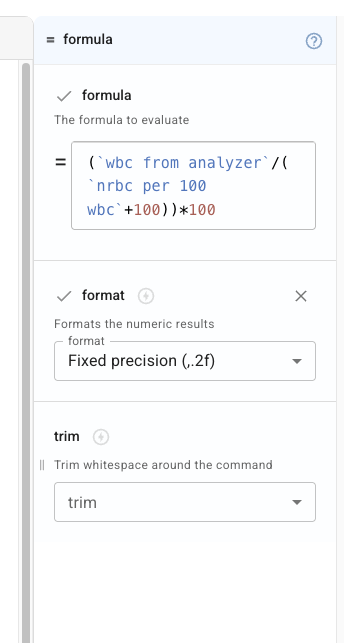
The adjusted WBC count is {=(`wbc from analyzer`/( `nrbc per 100 wbc`+100))*100; format=,.2f} {=units}{endformtoggle}
I need to name the variable adjusted WBC so that I can select if for use in another formula
Thank you
Carol
The adjusted WBC count is {adjusted=(wbc from analyzer/( nrbc per 100 wbc+100))*100}{=adjusted; format=,.2f} {=units}
1 Like
Thanks Dan. I'm unclear how to get there from this...

Do I need to apply another dynamic command? Even when I open Advanced features on that formula I can't find a place to name it.
When I entered in your formula, it doesn't seem to be able to recognize the fields.
Do I just need to type it in using { and select the values from the forms list as I go?

Thanks. If there is a video I couldn't find, I am happy to take a look at that.
Appreciate the help,
Carol
Hi @carol.haak,
Please try the one below. You have to use backticks instead of quotes for variable names.
{formtoggle: name=Provide adjusted WBC due to nRBC; default=no}{formtext: name=nRBC per 100 WBC} nucleated red blood cells are counted per 100 WBC. {note}Automated WBC count from analyzer = {formtext: name=WBC from analyzer; cols=10}{endnote}
The adjusted WBC count is {adjusted=(`wbc from analyzer`/( `nrbc per 100 wbc`+100))*100}{=adjusted; format=,.2f} {=units}{endformtoggle}
You can check our docs here.
Feel free to reach out if you have further questions on this.