These capabilities make it easier to programmatically integrate user management with other systems. Organization administrators can access it by clicking the "Integrations" button on their organization page.
You can use Text Blaze's {click} command to click buttons or other elements in a webpage. You can provide a CSS selector or an XPath selector to tell it what element to click on.
Previously, this selector could not be dynamic, and you could not include formulas or other dynamic content in the selector.
This month we have changed that. Selectors for the {click} command can now use dynamic logic such as formulas, allowing you to change which element is clicked based on dynamic conditions.
AI Blaze Highlights
An upgrade model to our basic model
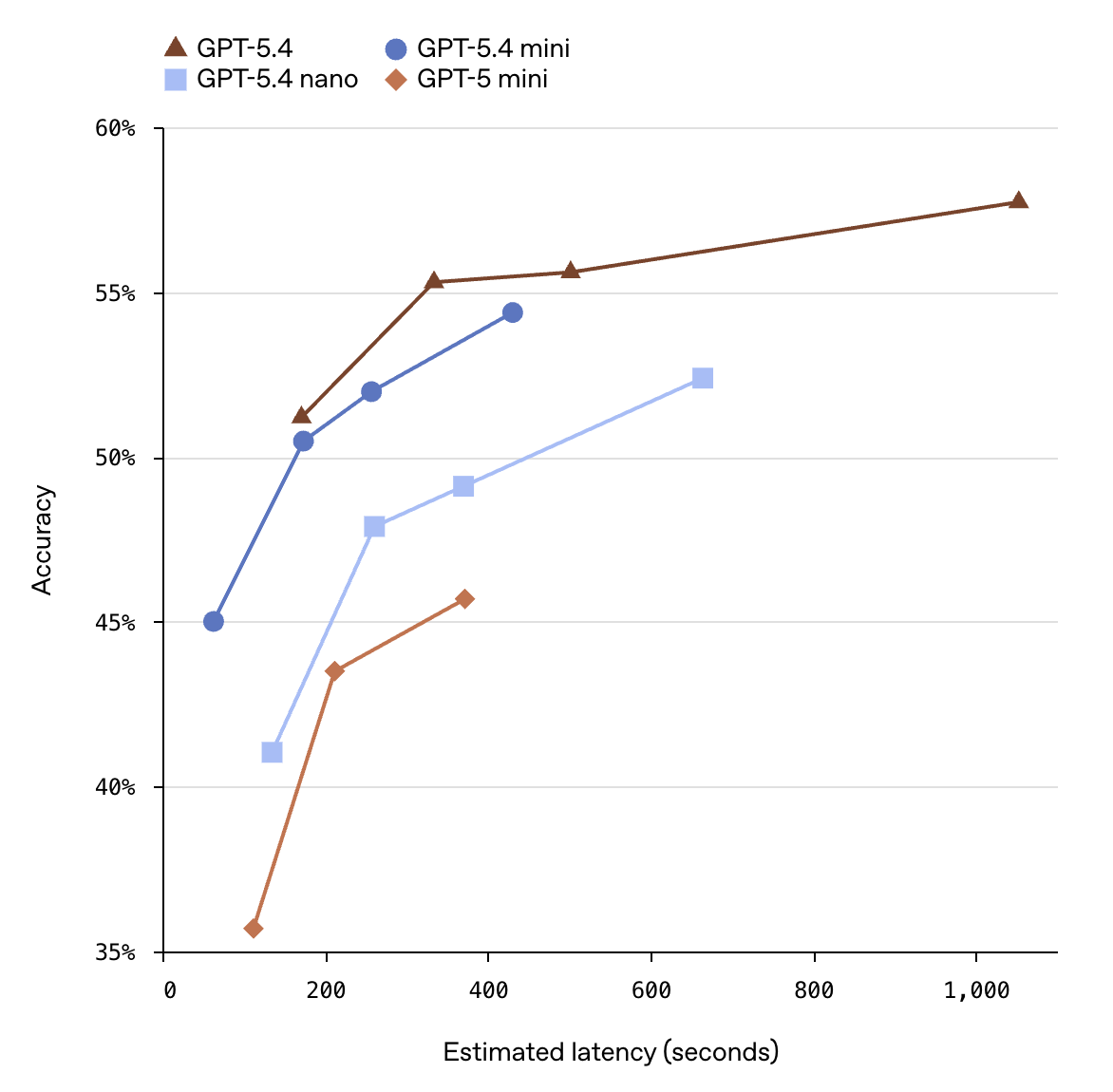
AI Blaze supports advanced and basic models with different levels of usage. This month we upgraded our basic model to GPT-5.4 nano.
OpenAI reports significant improvements for this model:
Grammit is our AI grammar and spell checker, and we would love your feedback on it.
Over the past six months, we've made large improvements to both the quality of the corrections and its speed. Please give it a spin and let us know what you think.
And remember...
We're always here for you! If you ever need a helping hand, don't hesitate to drop a line in our Question and Answer community forums. And if there's something you'd love to see, we'd be absolutely thrilled to hear about it in the Feature Ideas section.
The update to the {click} command sounds very interesting. Can you provide an example of what a snippet would look like with dynamic logic included in a {click} command? I'm interested in seeing the syntax specifically.
This capability also let you build up the selector as a combination of strings, which can be helpful if the selector depends on something that isn't known when the snippet is written (like a value that is on the page itself).
Yeah this functionality is perfect for CRM’s. Specifically Salesforce in our Org, with workflows being in Cases 98.4% of the time. We have snippets where the final step is offering the user options for changing case status, priority, etc. This works so well. I am going to work on upgrading the UI to give users these options as button clicks instead of formtoggles though.
Scott, is it possible to extend dynamic logic to the {site} command as well? One use case I have in mind is, for some snippets, I don't know the URL (i.e., {site: url}) until after the snippet is inserted. With dynamic logic, I might be able to solve this issue. Please let me know if this a possibility, or if there is a different workaround option.
The selector of the {site} command cannot be dynamic currently. It's something we may add in the future, though.
For now, you can have multiple {site}'s and use an {if} command to select which one to use. For example:
{if: {site: domain} = "community.blaze.today"}
{site: selector=.xyz} <- community.blaze.today specific selector
{elseif: {site: domain} = "mail.google.com"}
{site: selector=.abc} <- Gmail specific selector
{else}
Use this snippet on the Community or Gmail!
{endif}
Hi Alex, it's currently GPT-5.1. We need to get that updated, but we do recommend the Sonnet model over the ChatGPT model for our advanced model choice.
Thanks Scott. I agree Sonnet is a bit smarter, but I do like the speed of 5.1. I’m using GPT 5.5 elsewhere and it’s been incredible, even with no or low thinking.
@Alex_Arbab-Zadeh I am not sure when we'll update it. We'll announce any model updates in these monthly updates.
Sonnet 4.6 is still our recommended option for now, though! (Note: I do feel Sonnet is getting faster, but I don't have data and could be wrong about that.)
One suggestion: you could keep both the previous and latest models in the selector, so people can choose whether to move to the new one or keep using the old one if they prefer its output.
That feels better than a wholesale switch each time, as a model "upgrade" can sometimes change the output for certain tasks in undesirable ways. There isn't really a one-size-fits-all approach that works for everyone.
 User API launched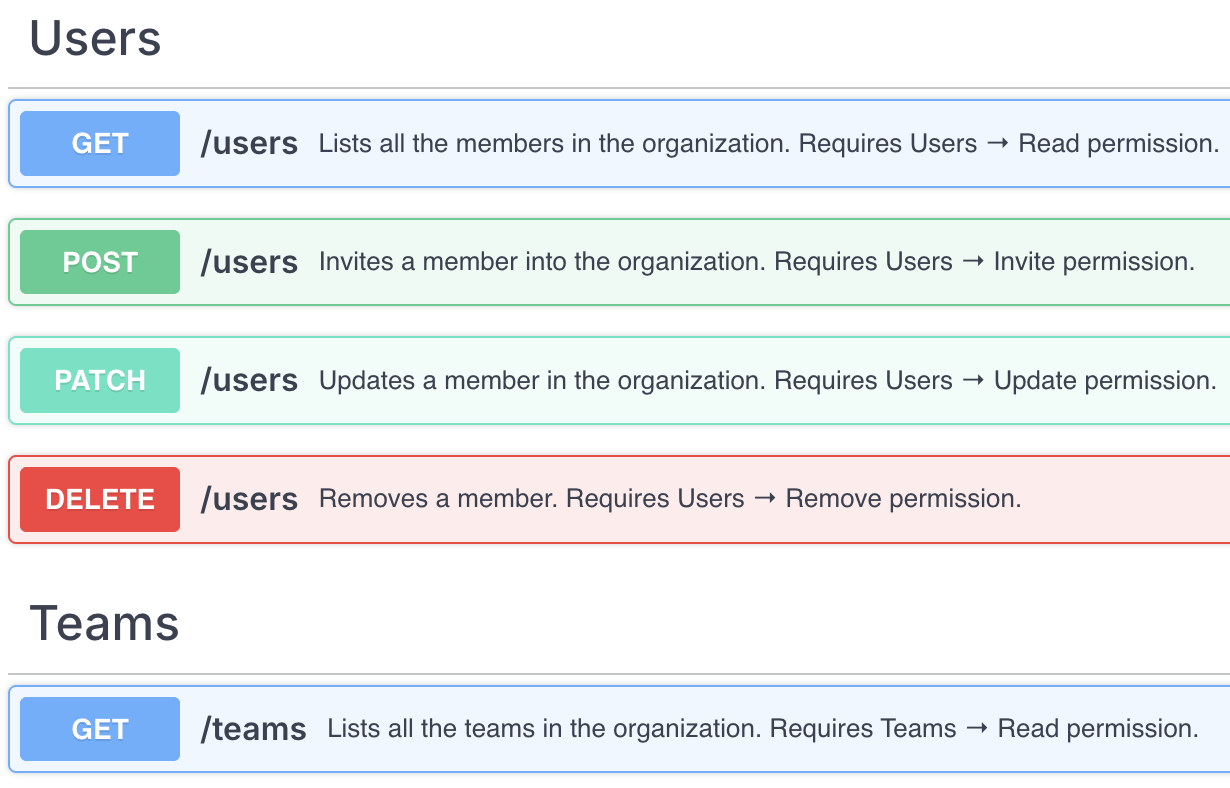
 {click} command can be dynamic
 An upgrade model to our basic model