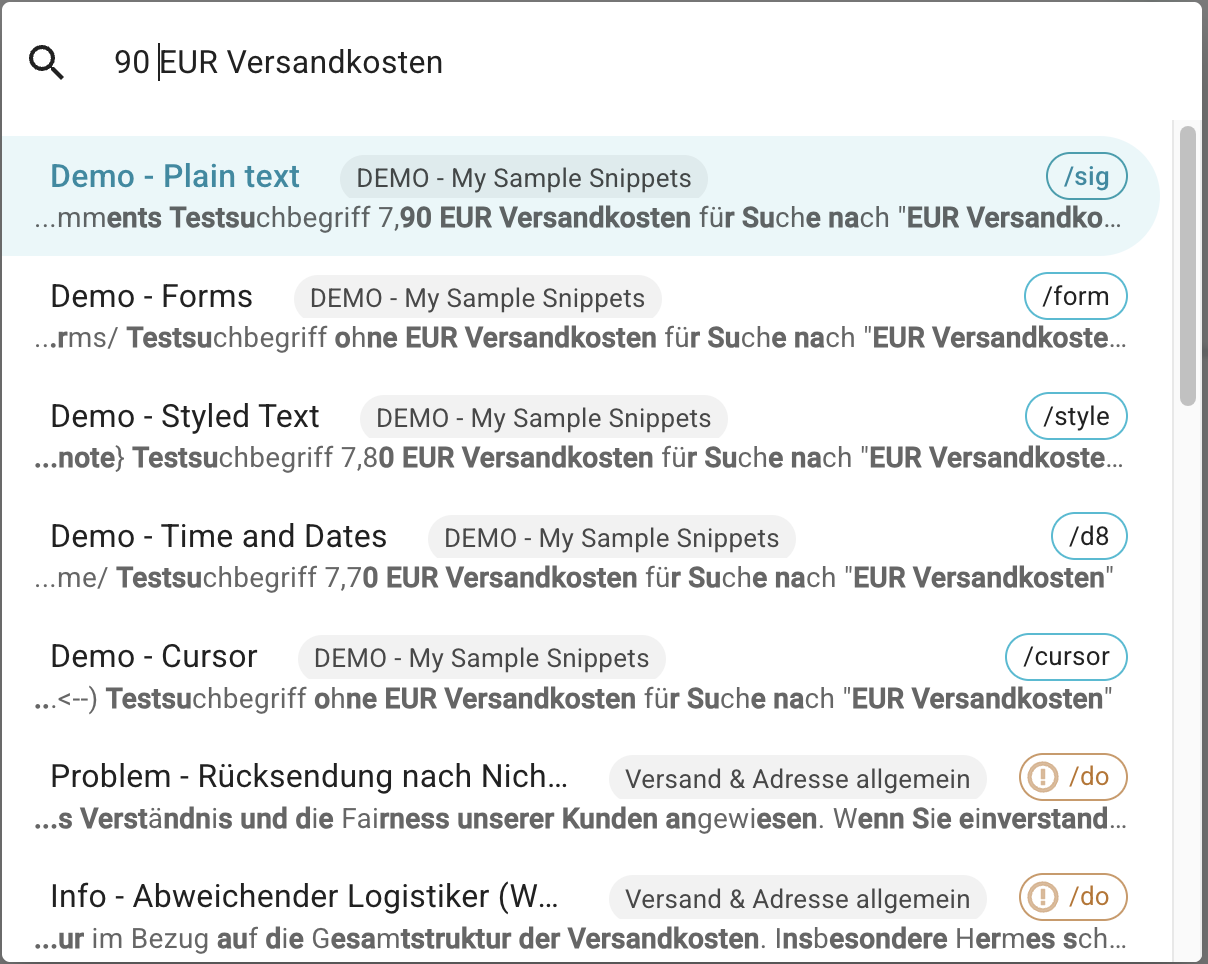
The search function seems to have a certain tolerance setting, so that it includes parts of a search even when the actual search query wouldn't be an exact match.
I frequently use the search to find specific sections that have been used in multiple snippets. For this, however, I need exact results, not results that might also be a match.
Please add an option to the search that offers the possibility of an exact or more approximate match (like it is at the moment).
Hi Sascha,
Thanks for your post. We'll take this into consideration as we continue to improve the search experience.
Could you share an example of a search term where the current tolerance/fuzzy matching causes issues for you? Additionally, how do you see exact search being implemented? (e.g. toggle, replacing the current search, etc.)
Best regards,
Alexander
Hi Alexander,
a typical example would be searching for a text passage where we define the shipping costs of our webshop for a specific country in several snippets.
In this case, I would search for the historical values used, something like this, so I can update them:
EUR shipping
An exact match would be, for example,
- 5.00 EUR shipping but also
- 7.90 EUR shipping
However, even when I put this phrase in quotation marks, I get significantly more snippets than exact matches and more hits than I'd like.
So you could implement the use of quotation marks or make it possible to toggle between exact and more soft search-results.
And please also implement a tagging system for snippets.
Hi Sascha,
Thank you for the details and feedback, I will share this with my team.
Best regards,
Alexander
Hi Sascha, just to confirm, the exact matches should appear before the fuzzy matches. For example, if you search for 7.90 EUR, then all the exact matches for 7.90 EUR should appear before the fuzzy matches for it. Is that similar to what you've observed?
I'll take a look at it and check it. However, if there were a way to make a search exact (f.e. using quotation marks), it would be easier to see where the boundary lies between exact and fuzzy results.
Yes, the exact result is placed 1st in the list of exact and fuzzy records!
It seems that the text matching the search should be displayed in bold, but this isn't working correctly or at least, I don't quite understand the output formatting.
Search query:
90 EUR Versandkosten (what does mean "90 EUR shipping costs")
in 1. result and all other cent-values ending with "0" would be correct, but the logic quickly breaks down after that, or rather I do not understand it / want to dive to deep into it.
For me it seems like the fuzzyness is simply set too loosely.
Thanks for your feedback. Yes, results other than the exact matches are definitely a bit fuzzy  It might make sense to help differentiate fuzzy match substrings from exact match substrings, for example, with the color used to highlight them. We'll take a look.
Hi Gaurang,
another approach for significantly better overview and searchability would be to optionally limit the search to one (or more?) folders.
For example, a search could be limited by selecting a folder and expanding its contents.
Ideally, a search could be optionally restricted to...:
- Selected folder
- All expanded folders
Hi all, we have recently made two updates to the Text Blaze Dashboard that should address the feedback:
- Search results containing exact matches are always shown at the top of the list. The exact matches are now highlighted with a yellow background to distinguish them from fuzzy matches.
- We have a dedicated "Folder" search now to search for folders instead of snippets.
See April Development Update for a screenshot.
For now, I will mark this thread as resolved. If you'd like any suggestions or clarifications, please feel free to continue the discussion here or in a separate topic.
This update was very helpful @Gaurang_Tandon Thank you!