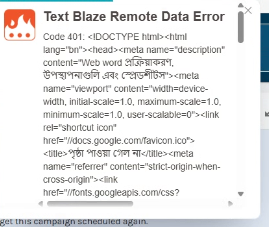
I have a snippet that my department uses that we the command, and then we have a Google.Script add on that sends the info from the snippet to a Google Sheet. This has worked seamlessly for every member in my department but we just hired a new person and they are getting this error when inserting the snippet: Text Blaze Remote Data Error Code 401. The snippet is inserting, but then it is not sending the info to the google sheet. Do you know why that would be? I am guessing there is just a setting somewhere that is prohibiting the data from being sent from Textblaze extension to the App Script, but I just don't know where to start in getting the webhook to work on execution.
Hi Allison,
That error looks like Google is not accepting the request and is returning an error page as HTML. If you look at the full response, there probably is a message somewhere in it indicating the specific reason. If you share it, I would be happy to take a look, but please make sure to redact any sensitive information.
I would also recommend you take a look at Data Blaze, a companion product to Text Blaze. It's a spreadsheet that integrates directly with Text Blaze.
You can use the built-in Text Blaze {dbinsert} command to insert data from a Text Blaze snippet into Data Blaze:
Thank you Scott! There were actually issues with the Google side (as you said). I got it all figured out and it's working again!
Glad to hear that!