The code block and button are really the game changer of Text Blaze and thanks for the update.
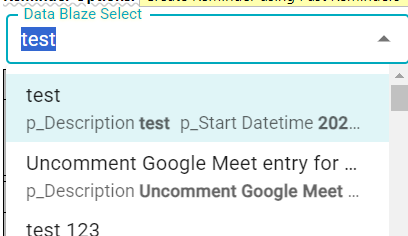
Therefore, we hope that we can also dynamically update data source of Datablaze "Read from table" dropdown field via code block / button. Although we can create the dropdown list with dynamic source ourselves, the UI itself is not as interactive and it does not have broadmatch search like the Datablaze dropdown field.
Hope to hear some update for this part soon. Thanks!
What kind of changes would you like to make? You can already embed form variables in certain places. E.g. WHERE type = {=my_type} which will automatically rerun when the my_type form variable changes.
For example, I use DBSelect to read data from a Task table with condition E.g. WHERE User = (=this_User}
After I use button to perform instant DBInsert a new row into the Task table, can the DBSelect's dataset to capture the new row without re-firing the snippet? Now I can use another code block function to fetch the latest dataset to snippet but cannot apply to DBSelect.
What do you think about automatically refreshing DBSELECT's within a snippet when the snippet does a mutation (insert/update/delete) to that DBSELECT's space?
This is something we could detect and maybe it would make sense to just automatically do.
Automatically refreshing the DBSELECT after a mutation is cool.
However, one scenario is that DBSELECT might hit "cancelling query" error, can we make it refresh again without any mutation in the table? (without re-firing the snippet)
Hi Scott, please refer to the screenshot example below. When the DBSELECT hits the "cancelling query due to timeout" error, we can only re-firing the snippet to try again, but it is not convenient when we intend to design the snippet with code block & button.