As the title suggests and I am kinda not that good in terms of using BSQL Data Blaze with Text Blaze, is there a way to use a list as a condition in: "WHERE includes(columnList, @orderedList)"? As I think, it only takes a single value.
For example:
Inside the ordered list in Text Blaze, I have these two values ["fruit", "vegetable"]

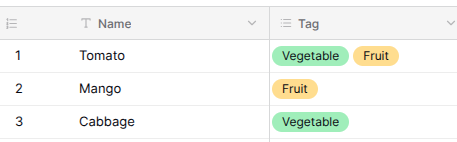
In Data Blaze, there is a space where there are two columns, one for the name (Single Text Field) and one for the tags (Multiple Select):
Now since the values inside the ordered list are both fruits and vegetables, I want it so that in dbselect, you will only have an option to select Tomato. But when fruit is the only value that is present inside the ordered list, you will have the option to select both Tomato and Mango.
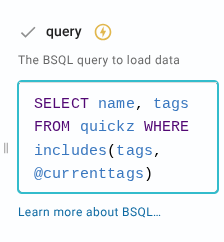
I have this query inside the DBSelect, which as you can guess, doesn't work since there is no such value as:
["fruit","vegetable"]
--inside any of the tags, which what I meant by that is that there is no such object, with a list inside of them as their tag and that is not how it's supposed to work, such as:
Banana | Fruit, ["fruit","vegetable"]
So is there any way to have this implemented? There is not that much thing to look into the current Data Blaze documentation, so yeah I am pretty hopeless
Hi @James_Loria
Try something like this:
{currenttags=["Fruit","Vegetable"]}
{dbselect: SELECT Name FROM Table1 where every([count(@currenttags)<1 or includes(Tag, @currenttags[1]),count(@currenttags) < 2 or includes(Tag, @currenttags[2]),count(@currenttags) < 3 or includes(Tag, @currenttags[3])]) limit 200; space=id; menu=yes}
This is the query I wrote:
SELECT Name FROM Table1 WHERE every([
  count(@currenttags) < 1 or includes(Tag, @currenttags[1]),
  count(@currenttags) < 2 or includes(Tag, @currenttags[2]),
  count(@currenttags) < 3 or includes(Tag, @currenttags[3])
]) LIMIT 200
Here's a brief explanation of the row filtering:
- Each row is checked against all the three conditions before it is selected for output.
- Each line handles one tag from the list you specified in your snippet (e.g.,
@currenttags[1] is the first tag, @currenttags[2] is the second, and so on)
- The first condition:
count(@currenttags) < N is a safety check. If the list you specified in your snippet has fewer than N items, this condition is satisfied automatically.
- Otherwise, the second condition
includes(Tag, @currenttags[N]) kicks in. This checks whether the row's Tag column contains the tag you need
- So, the compound condition on each line is satisfied only when either of the conditions is satisfied.
every([...]) ensures that the condition on each line must be satisfied for the given row is seleted for output.- As an example, if your list of currenttags can have upto 5 items, you would extend that query to have 5 expressions in the same pattern.
Let me know if that makes sense!
As of now, it doesn't make any sense lol! But thank you, it works as I expected. I'll try to understand how this works along the way. Just a few confirmations:
- Would it affect the query if I were to add additional columns for other things like description and such?
- As well as adding additional rows and tags?
The part after WHERE in the query is your condition to select rows. If you want to select additional columns from the already selected rows, you can add their names after SELECT without any issues.
I think so. Give it a try and let us know how that goes!
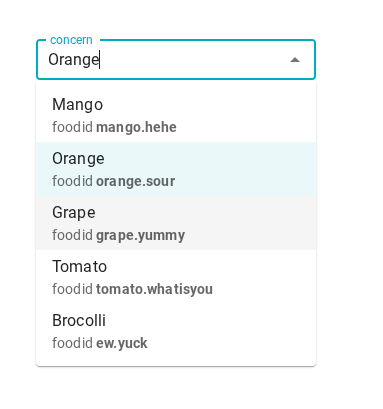
Hello @Gaurang_Tandon! Sorry for the bother, I just wanted to ask if there is a way to like SELECT an additional column to use on your snippet but not show up on the DBSelect?
For example, keeping the name of the food but the "foodid" is completely hidden in the selector while still being usable in your snippet.
Or is there a much better way to tackle this? I'm pretty clueless in terms of data blaze things
Hey @James_Loria I don't think that's possible with our built-in Data Blaze menu selector. You would have to instead get all the data from {dbselect} (by setting menu to false to get the data as a list), and then write your own filter/search UI with {formtext} and custom formula logic.