Text Blaze Highlights
 New Formula Functions
Text Blaze formulas let you build dynamic snippets. This month we've added two new formula functions to Text Blaze.
The new fromCSV function makes it easy to read data formatted as a CSV table into a snippet list. You can read data both with and without a header row.
With a header row:
{=fromCSV("Name,Favorite Color\nJohn,Red\nJane,Green")}
Without a header row:
{=fromCSV("John,Red\nJane,Green", no)}
The new randomItem function makes it easy to sample a random item from a list of values.
{=randomItem(["a", "b", "c"])} {=randomItem(["a", "b", "c"])} {=randomItem(["a", "b", "c"])} {=randomItem(["a", "b", "c"])} {=randomItem(["a", "b", "c"])} {=randomItem(["a", "b", "c"])}
You can also specify weights for each item. Here, "b" will never be selected, and "c" will be chosen three times more often than "a".
{=randomItem(["a", "b", "c"], [1, 0, 3])} {=randomItem(["a", "b", "c"], [1, 0, 3])} {=randomItem(["a", "b", "c"], [1, 0, 3])} {=randomItem(["a", "b", "c"], [1, 0, 3])} {=randomItem(["a", "b", "c"], [1, 0, 3])} {=randomItem(["a", "b", "c"], [1, 0, 3])}
AI Blaze Highlights
 Attach Files to your Conversations
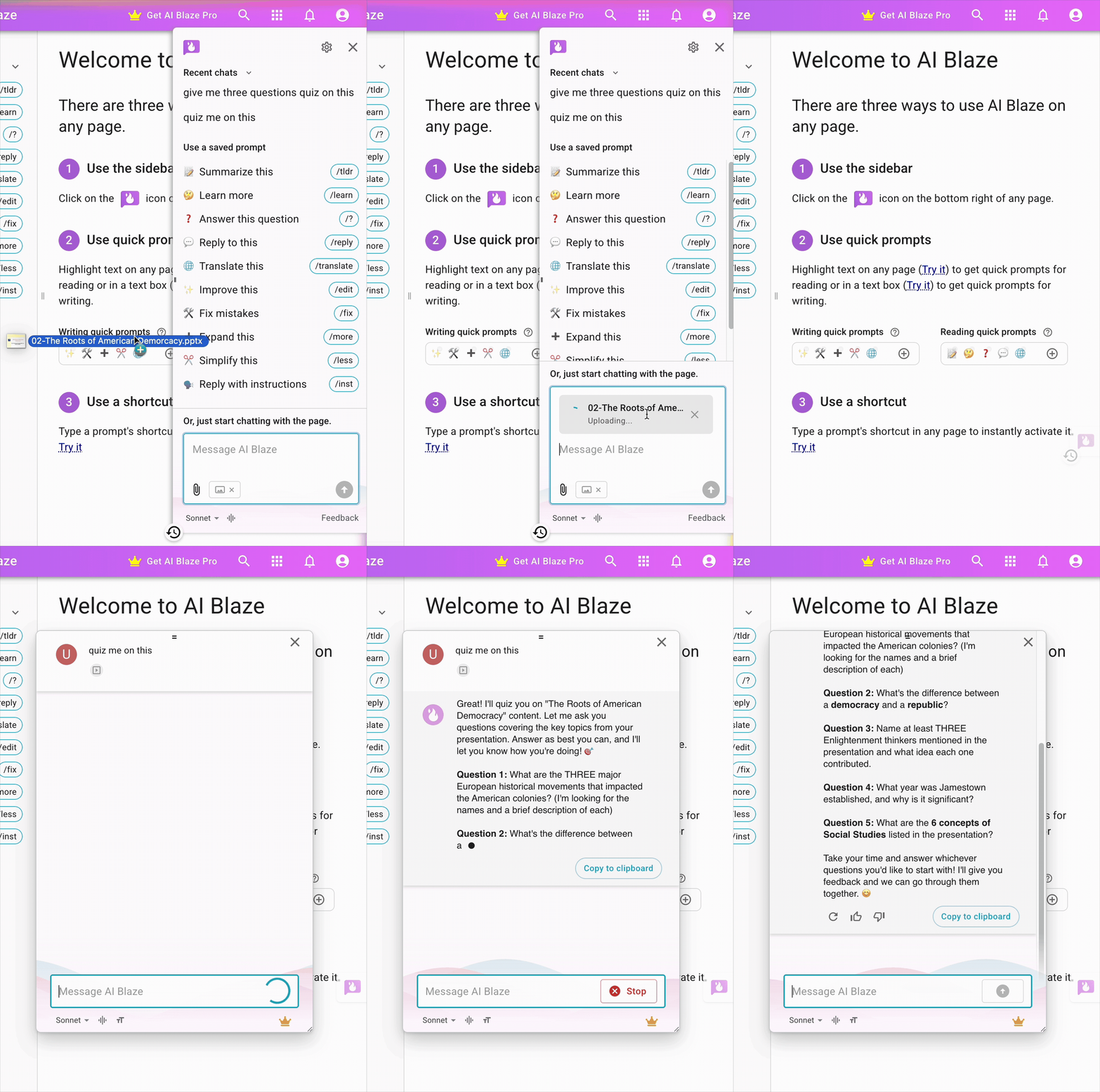
One of our top requested features for AI Blaze has been the ability to upload files as part of a conversation.
We've now added support for this feature. When asking a question in the sidebar, you can now upload one or more files that AI Blaze will use in the conversation.
Data Blaze Highlights
 Expanded BSQL Query Capabilities
We've added support for new SQL capabilities in BSQL.
First is LIKE and ILIKE. These allow you to do a quick fuzzy search across your data. For example, if you wanted to find all users whose names start with "Sc", you could use:
SELECT name FROM Customers WHERE name LIKE "Sc%"
The "%" above is a wildcard that matches any set of characters. LIKE is case-sensitive, and ILIKE is case-insensitive.
The second new BSQL feature is DISTINCT. It allows you to easily get the list of distinct, or unique, values in a field. For instance, if I wanted to get all the unique names from a column, I could write:
SELECT DISTINCT name FROM Customers
 Scheduled Maintenance Upgrade
On Friday, February 13th at 11 PM Eastern Time we will begin an upgrade of the Data Blaze database in order to improve performance. We anticipate this to complete by 4 AM Eastern Time on Saturday, February 14th.
During most of the upgrade, Data Blaze will allow reading data along with creating and editing rows, but will not allow creating new tables or new fields. For approximately an hour towards the end of the upgrade, Data Blaze will be in read-only mode. For approximately 5 minutes at the end of the upgrade process, Data Blaze will be inaccessible.
And remember... 
We're always here for you! If you ever need a helping hand, don't hesitate to drop a line in our Question and Answer community forums. And if there's something you'd love to see, we'd be absolutely thrilled to hear about it in the Feature Ideas section.
