I want to submit the idea of having access to some kind of variable in the {click} command.
Actually, I've tried to encapsulate a click command as a function, with and without a parameter. It doesn't work. Here's my use case :
I have autopilot to click on specific elements in my page (using xpath selectors in this case)
I need to click on many elements to change some text in the current web page.
For many of the elements, the xpath are globally the same and will only change one simple element in it
Replace "main param" in page (ex: "FILE")
{click: xpath=//div[@class="oe_view_manager_view_list"]//td[@data-field="key" and div/text()="FILE"]; trim=yes}{key: tab; trim=yes}{key: cmd-a; trim=yes}{key: backspace; trim=yes}newfilename{wait: delay=+0.1s; trim=yes}
Click "Processus section" in page (ex: "PROCESSUS")
{click: xpath=//tbody[@class="ui-sortable"]//td[@data-field="name" and div/text()="PROCESSUS"]; trim=yes}{wait: delay=+0.1s; trim=yes}
Replace "Sub param" (ex: "FILE") • after a Click "Processus section"
{click: xpath=//div[@class="oe_popup_form"]//td[@data-field="key" and div/text()="FILE"]}{key: tab}{key: cmd-a}{key: backspace}newfile(subparam){wait: delay=+0.1s; trim=yes}
I'd like to be able to make things more clean, readable, re-usable and maintanable by creating functions wrapping my clicks as below :
// I had to escape the line in the post form so in case I doesn't render right, here it is :
{getXpath=(parameter) -> "//div[@class=\"oe_view_manager_view_list\"]//td[@data-field=\"key\"]/div[text()=\"" & parameter & "\"][1]"}
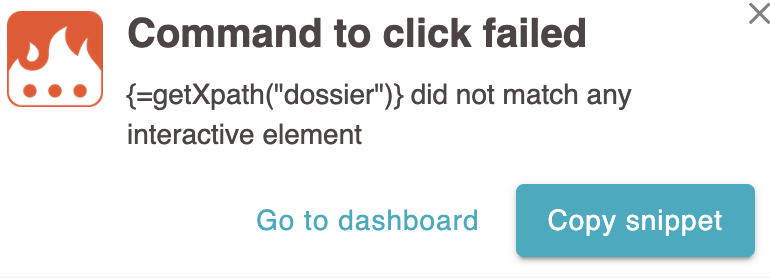
This doesn't seem to work and the "fail" popup is not giving enough clue as I don't know if the {=getXpath("dossier")} part was interpreted correctly or not :
Side note : I tried to use this (string rendered inside the note in the snippet) in my chrome console and it does get me the right element of the page :